Special folder
In-game article clicks load inline without leaving the challenge.
On Microsoft Windows, a special folder is a folder that is presented to the user through an interface as an abstract concept instead of an absolute folder path. (The synonymous term shell folder is sometimes used instead.) Special folders make it possible for any application to ask the operating system where an appropriate location for certain kinds of files can be found; independently of which version or user language of Windows is being used.
In Windows Server 2003 and earlier, a folder like the "Start Menu" had a different name on non-English versions of Windows. For example, on German versions of Windows XP it is "Startmenü". However, starting with Windows Vista, all versions of Windows use the same English named folders and only display different names in the Windows Explorer. In Windows 10 the user can switch to another display language and the names of the special folders will change.
Overview
Windows uses the concept of special folders to present the contents of the storage devices connected to the computer in a fairly consistent way that frees the user from having to deal with absolute file paths, which can (and often do) change between operating system versions, and even individual installations. The idea has evolved over time, with new special folders being added in every version of Windows after their introduction in Windows 95.[needs update?]
Microsoft's "Compatible with Windows" software logo requires that an application make use of special folder locations to locate the appropriate folders in which documents and application settings should be stored.
A special folder can either be a reference to a physical file system directory, or a reference to a "virtual" folder. In the former case, they are analogous to environment variables—in fact, many of the environment variables that are set in a user's session are defined by where the special folders are set to point to.
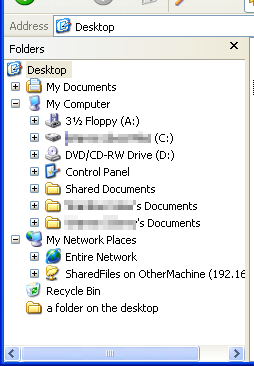
Virtual folders do not actually exist on the file system; they are instead presented through Windows Explorer as a tree of folders that the user can navigate. This is known as the Shell namespace. On Windows XP systems, the root of this namespace is the Desktop virtual folder, which contains the My Documents, My Computer (Computer from Windows Vista to 8.1 and This PC from Windows 10), My Network Places (Network Neighbourhood in Windows 95 and 98) and Recycle Bin virtual folders. Some virtual folders (like Desktop) have an accompanying special folder that is a reference to a directory on the physical file system. Windows Explorer displays the combined contents of a virtual folder and its associated file system folder to the user. This can be seen in Figure 1, which shows the Folder view in Windows XP's Explorer; in the Desktop virtual folder, the four standard virtual folders can be seen, as well as an additional folder, "a folder on the desktop", which is a real folder located in the Desktop directory in the user's profile.
Some third-party programs add their own virtual folders to Windows Explorer.
Other operating systems implement similar concepts to Windows special folders. For example, Linux distributions use standardized directories like /home/user/Documents and /etc, defined by the Filesystem Hierarchy Standard (FHS), while macOS uses folders such as "Home", "Documents", and "Library" for user and application data.
List of special folders
The following tables list most of the file system and virtual folders that are available as of Windows Vista. The OS version in which each special folder was introduced is given as well. Items like %USERPROFILE% and %windir% are Windows environment variables.
File system directories
| Special folder | Intended purpose | Default Location (in English. Non-English versions of Windows XP or earlier will use directory names appropriate to that language.) | First appeared in OS |
|---|---|---|---|
| AppData | Per-user application-specific files | On Windows 98 and Windows Me%windir%\Application Data On Windows 2000 and Windows XP%USERPROFILE%\Application Data On Windows Vista and later%APPDATA% | 98 |
| Briefcase | Files that need to be kept in sync | On Windows 95, Windows 98 and Windows Me%windir%\Desktop On Windows 2000 and later, not created by default but can be created in any folder. The Desktop.ini hidden system file inside the Briefcase and the Briefcase Explorer shell extension (SyncUI.dll) contained its functionality. Removed in Windows 10 Version 1703 and later. | 95 |
| Contacts | User's contacts | On Windows Vista and later %USERPROFILE%\Contacts | Vista |
| Cookies | Internet Explorer browser cookies | On Windows 98 and Windows Me%windir%\Cookies On Windows 2000 and later%USERPROFILE%\Cookies On Windows Vista and later%APPDATA%\Microsoft\Windows\Cookies | 98 |
| Desktop Directory | Files stored on the user's desktop | On Windows 95, Windows 98 and Windows Me%windir%\Desktop On Windows 2000 and later%USERPROFILE%\Desktop | 95 |
| Favorites | User's Favorites | On Windows 98 and Windows Me%windir%\Favorites On Windows 2000 and later%USERPROFILE%\Favorites | 98 |
| Fonts | Container folder for installed fonts | %windir%\Fonts | 95 |
| History | User-specific browser history | %USERPROFILE%\Local Settings\History | 98 |
| Internet Cache | User-specific Temporary Internet Files | On Windows 98 and Windows Me %windir%\Temporary Internet Files On Windows 2000 and Windows XP %USERPROFILE%\Local Settings\Temporary Internet Files On Windows Vista and Windows 7 %LOCALAPPDATA%\Microsoft\Windows\Temporary Internet Files On Windows 8 and later %LOCALAPPDATA%\Microsoft\Windows\INetCache | 98 |
| Local Application Data | User-specific and computer-specific application settings | On Windows 98 and Windows Me%windir%\Application Data On Windows 2000 and Windows XP%USERPROFILE%\Local Settings\Application Data On Windows Vista and later%LOCALAPPDATA% | 95 |
| My Documents | User's documents | On Windows 98 and Windows MeC:\My Documents On Windows 2000 and Windows XP%USERPROFILE%\My Documents On Windows Vista and later%USERPROFILE%\Documents | 98 |
| My Music | User's music | On Windows 98 and Windows MeC:\My Documents\My Music On Windows 2000 and Windows XP%USERPROFILE%\My Documents\My Music On Windows Vista and later%USERPROFILE%\Music | 98 |
| My Pictures | User's pictures | On Windows 98 and Windows MeC:\My Documents\My Pictures On Windows 2000 and Windows XP%USERPROFILE%\My Documents\My Pictures On Windows Vista and later%USERPROFILE%\Pictures | 98 |
| My Videos | User's video files | On Windows 98 and Windows MeC:\My Documents\My Videos On Windows 2000 and Windows XP%USERPROFILE%\My Documents\My Videos On Windows Vista and later%USERPROFILE%\Videos | 98 |
| Programs | User-specific "(All) Programs" groups and icons | On Windows 95, Windows 98, Windows 2000 and Windows XP%USERPROFILE%\Start Menu\Programs On Windows Vista and later%APPDATA%\Microsoft\Windows\Start Menu\Programs | 95 |
| Recent | User-specific "My Recent Documents" | On Windows 98%USERPROFILE%\Recent On Windows 2000 and Windows XP%USERPROFILE%\My Recent Documents On Windows Vista and later%APPDATA%\Microsoft\Windows\Recent | 98 |
| Send To | User-specific "Send To" menu items | On Windows 98, Windows 2000 and Windows XP%USERPROFILE%\SendTo On Windows Vista and later%APPDATA%\Microsoft\Windows\SendTo | 98 |
| Start Menu | User-specific "Start Menu" items | On Windows 95%windir%\Start Menu On Windows 98, Windows 2000 and Windows XP%USERPROFILE%\Start Menu On Windows Vista and later%APPDATA%\Microsoft\Windows\Start Menu | 95 |
| System | The Windows system directory | On Windows 95, Windows 98 and Windows Me 16-bit and 32-bit libraries and executables%windir%\System Some other 32-bit libraries and executables%windir%\System32 On Windows 2000 and later 32-bit Windows editions 32-bit libraries and executables%windir%\system32 16-bit libraries and executables%windir%\System On 64-bit Windows editions64-bit libraries and executables%windir%\System32 32-bit libraries and executables%windir%\SysWOW64 | 95 |
| Saved Games | User's Saved Games | %USERPROFILE%\Saved Games | Vista |
| Templates | User-specific document templates | On Windows 98 and Windows Me%windir%\ShellNew On Windows 2000 and Windows XP%USERPROFILE%\Templates On Windows Vista and later%APPDATA%\Microsoft\Windows\Templates | 98 |
Notes:
- The "Desktop" virtual folder is not the same thing as the "Desktop" special folder. The Desktop virtual folder is the root of the Windows Shell namespace, which contains other virtual folders.
- "Local Application Data" differs from "Application Data" in that files located in the "Local" variant are also intended to be specific to the machine it is on. This only has relevance if the user's profile is a Roaming Profile in a Windows Server domain environment.
- As with Desktop, the "My Documents" virtual folder differs from the "My Documents" special folder. If the virtual folder variant is asked for, it will appear in a file dialog as a sub-directory of the "Desktop" virtual folder, instead of the user's profile directory as it physically exists on the hard drive.
- If the "My Documents" folder is moved (e.g., to a network drive), attempting to access it via the shell variable will go to the original, default location.
Virtual folders
| Virtual Folder | Represents | OS |
|---|---|---|
| Recycle Bin | The aggregated contents of the Recycle Bin on all drives for the current user | 95 |
| Control Panel | Icons for Control Panel (Windows) applets | 95 |
| Desktop | The Windows Desktop | 95 |
| Drives | My Computer; contains virtual folders representing everything on the local machine, as well as mapped network drives | 95 |
| Internet | Resources located on the Internet; WebDAV connections, etc. | 98 |
| My Documents | Virtual folder of the user's My Documents folder; used as a child of the Desktop virtual folder | 98 |
| Network | Network Neighborhood (Windows 95 and 98) or My Network Places (Windows 2000 and later); contains virtual folders for representing all network resources | 95 |
| Search Results | Listing of the results of the last search of the computer (appears only after a search) | 2000 |
| Printers | Container folder for installed printers | 95 |
| Applications | Listing of all installed Applications, including Universal Windows Platform apps. | 10 |
Notes:
- The "Desktop" virtual folder is not the same thing as the "Desktop" special folder. The Desktop virtual folder is the root of the Windows Shell namespace, which contains other virtual folders.
- As with Desktop, the "My Documents" virtual folder differs from the "My Documents" special folder. If the virtual folder variant is asked for, it will appear in a file dialog as a sub-directory of the "Desktop" virtual folder, instead of the user's profile directory as it logically exists on the hard drive.
See also
- Folder redirection
- Tweak UI
- Apple File System – similar standard for macOS
- Unix directory structure — similar standard for Unix
- Filesystem Hierarchy Standard — similar standard for Linux
External links
- — MSDN documentation containing a complete list of all available special folders and virtual folders
- — knownfolderid: An extended list of (Win7 and later) special folders with their virtual folder IDs.