TIME (command)
In-game article clicks load inline without leaving the challenge.
In computing, TIME is a command in DEC RT-11, DOS, IBM OS/2, Microsoft Windows and a number of other operating systems that is used to display and set the current system time. It is included in command-line interpreters (shells) such as COMMAND.COM, cmd.exe, 4DOS, 4OS2 and 4NT.
Implementations
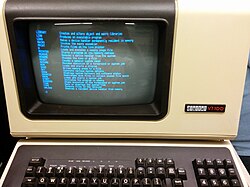
TIME command of RT-11SJ displayed on a VT100.The command is also available in the Motorola VERSAdos, Intel iRMX 86, PC-MOS, SpartaDOS X, ReactOS, SymbOS, and DexOS operating systems as well as in the EFI shell. On MS-DOS, the command is available in versions 1 and later.
In Unix, the date command displays and sets both the time and date, in a similar manner.
Syntax
The syntax differs depending on the specific platform and implementation:
DOS

TIME.COM (among other commands) in IBM PC DOS 1.0.OS/2 (CMD.EXE)
Note: /N means no prompt for TIME.
Windows (CMD.EXE)
When this command is called from the command line or a batch script, it will display the time and wait for the user to type a new time and press RETURN. Pressing RETURN without entering a new time will keep the current system time. The parameter '/T' will bypass asking the user to reset the time. The '/T' parameter is supported in Windows Vista and later and only if Command Extensions are enabled.
4DOS, 4OS2 and 4NT
Examples
OS/2 (CMD.EXE)
- Display the current system time:
Windows (CMD.EXE)
- To set the computer clock to 3:42 P.M., either of the following commands can be used:
4DOS, 4OS2 and 4NT
- Display the current system time:
See also
Further reading
- Wolverton, Van (1990). MS-DOS Commands: Microsoft Quick Reference, 4th Revised edition. Microsoft Press. ISBN 978-1556152894.
- Kathy Ivens; Brian Proffit (1993). OS/2 Inside & Out. Osborne McGraw-Hill. ISBN 978-0078818714.
- Frisch, Æleen (2001). Windows 2000 Commands Pocket Reference. O'Reilly. ISBN 978-0-596-00148-3.