WebSocket
In-game article clicks load inline without leaving the challenge.
WebSocket is a computer communications protocol, providing a bidirectional communication channel over a single Transmission Control Protocol (TCP) connection. The protocol was standardized by the IETF as RFC in 2011. The current specification allowing web applications to use this protocol is known as WebSockets. It is a living standard maintained by the WHATWG and a successor to The WebSocket API from the W3C.
WebSocket is distinct from HTTP used to serve most webpages. Although they are different, RFC states that WebSocket "is designed to work over HTTP ports 443 and 80 as well as to support HTTP proxies and intermediaries", making the WebSocket protocol compatible with HTTP. To achieve compatibility, the WebSocket handshake uses the HTTP Upgrade header to change from the HTTP protocol to the WebSocket protocol.
The WebSocket protocol enables full-duplex interaction between a web browser (or other client application) and a web server with lower overhead than half-duplex alternatives such as HTTP polling, facilitating real-time data transfer from and to the server. This is achieved by providing a standardized way for the server to send content to the client without being first requested by the client, and allowing messages to be exchanged while keeping the connection open. In this way, a two-way ongoing conversation can take place between the client and the server. The communications are usually done over TCP port number 443 (or 80 in the case of unsecured connections), which is beneficial for environments that block non-web Internet connections using a firewall. Additionally, WebSocket enables streams of messages on top of TCP. TCP alone deals with streams of bytes with no inherent concept of a message. Similar two-way browser–server communications have been achieved in non-standardized ways using stopgap technologies such as Comet or Adobe Flash Player.
Most browsers support the protocol, including Google Chrome, Firefox, Microsoft Edge, Internet Explorer, Safari and Opera.
The WebSocket protocol specification defines ws (WebSocket) and wss (WebSocket Secure) as two new uniform resource identifier (URI) schemes that are used for unencrypted and encrypted connections respectively. Apart from the scheme name and fragment (i.e. # is not supported), the rest of the URI components are defined to use URI generic syntax.
History
WebSocket was first referenced as TCPConnection in the HTML5 specification, as a placeholder for a TCP-based socket API. In June 2008, a series of discussions were led by Michael Carter that resulted in the first version of the protocol known as WebSocket. Before WebSocket, port 80 full-duplex communication was attainable using Comet channels; however, Comet implementation is nontrivial, and due to the TCP handshake and HTTP header overhead, it is inefficient for small messages. The WebSocket protocol aims to solve these problems without compromising the security assumptions of the web. The name "WebSocket" was coined by Ian Hickson and Michael Carter shortly thereafter through collaboration on the #whatwg IRC chat room, and subsequently authored for inclusion in the HTML5 specification by Ian Hickson. In December 2009, Google Chrome 4 was the first browser to ship full support for the standard, with WebSocket enabled by default. Development of the WebSocket protocol was subsequently moved from the W3C and WHATWG group to the IETF in February 2010, and authored for two revisions under Ian Hickson.
After the protocol was shipped and enabled by default in multiple browsers, the RFC was finalized under Ian Fette in December 2011.
RFC introduced compression extension to WebSocket using the DEFLATE algorithm on a per-message basis.
Web API
A web application (e.g. web browser) may use the WebSocket interface to maintain bidirectional communications with a WebSocket server.
Client example
In TypeScript.
WebSocket interface
| Type | Name | Description |
|---|---|---|
| Constructor | ws = new WebSocket(url [, protocols ]) | Start opening handshake. url: A string containing: Scheme: must be ws, wss, http or https. Host. Optional port: If not specified, 80 is used for ws and http, and 443 for wss and https. Optional path. Optional query. No fragment. Optional protocols: A string or an array of strings used as the value of the Sec-WebSocket-Protocol header in the opening handshake. Exceptions: SyntaxError: url parsing failed. url has an invalid scheme. url has a fragment. protocols has duplicate strings. |
| Method | ws.send(data) | Send data message. data: must be string, Blob, ArrayBuffer or ArrayBufferView. Return: undefined.Exceptions: InvalidStateError: ws.readyState is CONNECTING. Note: If the data cannot be sent (e.g. because it would need to be buffered but the buffer is full), the connection is closed and the error event is fired. |
ws.close([ code ] [, reason ]) | Start closing handshake. Optional code: If specified, must be 1000 (Normal closure) or in the range 3000 to 4999 (application-defined). Defaults to 1000. Optional reason: If specified, must be a string whose UTF-8 encoding is up to 123 bytes. Defaults to an empty string. Return: undefined.Exceptions: InvalidAccessError: code is not 1000 nor is in the range 3000 to 4999. SyntaxError: UTF-8-encoded reason is longer than 123 bytes. Note: If ws.readyState is OPEN or CONNECTING, ws.readyState is set to CLOSING and the closing handshake starts. If ws.readyState is CLOSING or CLOSED, nothing happens (because the closing handshake has already started). | |
| Event | ws.onopen = (event) => {} ws.addEventListener("open", (event) => {}) | Opening handshake succeeded. event type is Event. |
ws.onmessage = (event) => {} ws.addEventListener("message", (event) => {}) | Data message received. event type is MessageEvent. This event is only fired if ws.readyState is OPEN. event.data is the data received, of type: string for text. Blob or ArrayBuffer for binary (see ws.binaryType). event.origin is ws.url but only with the scheme, host, and port (if any). | |
ws.onclose = (event) => {} ws.addEventListener("close", (event) => {}) | The underlying TCP connection closed. event type is CloseEvent. event.code: status code (integer). event.reason: reason for closing (string). event.wasClean: true if the TCP connection was closed after the closing handshake was completed, else false. Note: If the received Close frame contains a payload, event.code and event.reason get their value from the payload. If the received Close frame contains no payload, event.code is 1005 (No code received) and event.reason is an empty string. If no Close frame was received, event.code is 1006 (Connection closed abnormally) and event.reason is an empty string. | |
ws.onerror = (event) => {} ws.addEventListener("error", (event) => {}) | Connection closed due to error. event type is Event. | |
| Attribute | ws.binaryType (string) | Type of event.data in ws.onmessage when a binary data message is received. Initially set to "blob" (Blob object). May be changed to "arraybuffer" (ArrayBuffer object). |
| Read-only attribute | ws.url (string) | URL given to the WebSocket constructor with the following transformations: If scheme is http or https, change it to ws or wss respectively. |
ws.bufferedAmount (number) | Number of bytes of application data (UTF-8 text and binary data) that have been queued using ws.send() but not yet transmitted to the network. It resets to zero once all queued data has been sent. If the connection closes, this value will only increase, with each call to ws.send(), and never reset to zero. | |
ws.protocol (string) | Protocol accepted by the server, or an empty string if protocols was not specified in the WebSocket constructor. | |
ws.extensions (string) | Extensions accepted by the server. | |
ws.readyState (number) | Connection state. It is one of the constants below. Initially set to CONNECTING. | |
| Constant | WebSocket.CONNECTING = 0 | Opening handshake is currently in progress. The initial state of the connection. |
WebSocket.OPEN = 1 | Opening handshake succeeded. The client and server may send messages to each other. | |
WebSocket.CLOSING = 2 | Closing handshake is currently in progress. Either ws.close() was called or a Close message was received. | |
WebSocket.CLOSED = 3 | The underlying TCP connection is closed. |
Protocol
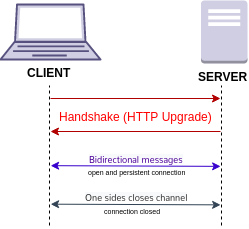
Steps:
- Opening handshake: HTTP request and HTTP response.
- Frame-based message exchange: data, ping and pong messages.
- Closing handshake: close message (request then echoed in response).
Opening handshake
The client sends an HTTP request (method GET, version ≥ 1.1) and the server returns an HTTP response with status code 101 (Switching Protocols) on success. HTTP and WebSocket clients can connect to a server using the same port because the opening handshake uses HTTP. Sending additional HTTP headers (that are not in the table below) is allowed. HTTP headers may be sent in any order. After the Switching Protocols HTTP response, the opening handshake is complete, the HTTP protocol stops being used, and communication switches to a binary frame-based protocol.
| Side | Header | Value | Mandatory |
|---|---|---|---|
| Request | Origin | Varies | Yes (for browser clients) |
| Host | Varies | Yes | |
| Sec-WebSocket-Version | 13 | ||
| Sec-WebSocket-Key | base64-encode(16 random bytes) | ||
| Response | Sec-WebSocket-Accept | base64-encode(SHA1(Sec-WebSocket-Key + "258EAFA5-E914-47DA-95CA-C5AB0DC85B11")) | |
| Both | Connection | Upgrade | |
| Upgrade | websocket | ||
| Sec-WebSocket-Protocol | The request may contain a comma-separated list of strings (ordered by preference) indicating application-level protocols (built on top of WebSocket data messages) the client wishes to use. If the client sends this header, the server response must be one of the values from the list. | No | |
| Sec-WebSocket-Extensions | Used to negotiate protocol-level extensions. The client may request extensions to the WebSocket protocol by including a comma-separated list of extensions (ordered by preference). Each extension may have a parameter (e.g. foo=4). The server may accept some or all extensions requested by the client. This field may appear multiple times in the request (logically equivalent to a single occurrence containing all values) and must not appear more than once in the response. |
Example request:
Example response:
The following Python code generates a random Sec-WebSocket-Key.
The following Python code calculates Sec-WebSocket-Accept using Sec-WebSocket-Key from the example request above.
Sec-WebSocket-Key and Sec-WebSocket-Accept are intended to prevent a caching proxy from re-sending a previous WebSocket conversation, and does not provide any authentication, privacy, or integrity.
Though some servers accept a short Sec-WebSocket-Key, many modern servers will reject the request with error "invalid Sec-WebSocket-Key header".
Frame-based message
After the opening handshake, the client and server can, at any time, send data messages (text or binary) and control messages (Close, Ping, Pong) to each other. A message is composed of one frame if unfragmented or at least two frames if fragmented.
Fragmentation splits a message into two or more frames. It enables sending messages with initial data available but complete length unknown. Without fragmentation, the whole message must be sent in one frame, so the complete length is needed before the first byte can be sent, which requires a buffer. It was proposed to extend this feature to enable multiplexing several streams simultaneously (e.g. to avoid monopolizing a socket for a single large payload), but the protocol extension was never accepted.
- An unfragmented message consists of one frame with
FIN = 1andopcode ≠ 0. - A fragmented message consists of one frame with
FIN = 0andopcode ≠ 0, followed by zero or more frames withFIN = 0andopcode = 0, and terminated by one frame withFIN = 1andopcode = 0.
Frame structure
| Offset (bits) | Field | Size (bits) | Description |
|---|---|---|---|
| 0 | FIN | 1 | 1 = final frame of a message.0 = message is fragmented and this is not the final frame. |
| 1 | RSV1 | 1 | Reserved. Must be 0 unless defined by an extension. If a non-zero value is received and none of the negotiated extensions defines the meaning of such a non-zero value, the connection must be closed. |
| 2 | RSV2 | 1 | |
| 3 | RSV3 | 1 | |
| 4 | Opcode | 4 | See opcodes below. |
| 8 | Masked | 1 | 1 = frame is masked (i.e. masking key is present and the payload has been XORed with the masking key).0 = frame is not masked (i.e. masking key is not present). See client-to-server masking below. |
| 9 | Payload length | 7, 7+16 or 7+64 | Length of the payload (extension data + application data) in bytes. 0–125 = This is the payload length.126 = The following 16 bits are the payload length.127 = The following 64 bits (MSB must be 0) are the payload length. Endianness is big-endian. Signedness is unsigned. The minimum number of bits must be used to encode the length. |
| Varies | Masking key | 0 or 32 | Random nonce. Present if the masked field is 1. The client generates a masking key for every masked frame. |
| Payload | Extension data | Payload length (bytes) | Must be empty unless defined by an extension. |
| Application data | Depends on the opcode |
Opcodes
| Frame type | Opcode | Related Web API | Description | Purpose | Fragmentable | Max. payload length (bytes) | |
|---|---|---|---|---|---|---|---|
| Continuation frame | 0 | Non-first frame of a fragmented message. | Message fragmentation | 263 − 1 | |||
| Non-control frame | Text | 1 | send(), onmessage | UTF-8-encoded text. | Data message | Yes | |
| Binary | 2 | Binary data. | |||||
| 3–7 | Reserved for further non-control frames. May be defined by an extension. | ||||||
| Control frame | Close | 8 | close(), onclose | The WebSocket closing handshake starts upon either sending or receiving a Close frame. It may prevent data loss by complementing the TCP closing handshake. No frame can be sent after sending a Close frame. If a Close frame is received and no prior Close frame was sent, a Close frame must be sent in response (typically echoing the status code received). The payload is optional, but if present, it must start with a two-byte big-endian unsigned integer status code, optionally followed by a UTF-8-encoded reason message not longer than 123 bytes. | Protocol state | No | 125 |
| Ping | 9 | May be used for latency measurement, keepalive and heartbeat. Both sides can send a ping (with any payload). Whoever receives it must, as soon as is practical, send back a pong with the same payload. A pong should be ignored if no prior ping was sent. | |||||
| Pong | 10 | ||||||
| 11–15 | Reserved for further control frames. May be defined by an extension. |
Client-to-server masking
A client must mask all frames sent to the server. A server must not mask any frames sent to the client. Frame masking applies XOR between the payload and the masking key. The following pseudocode describes the algorithm used to both mask and unmask a frame.
Status codes
| Range | Allowed in Close frame | Code | Description |
|---|---|---|---|
| 0–999 | No | Unused | |
| 1000–2999 (Protocol) | Yes | 1000 | Normal closure. |
| 1001 | Going away (e.g. browser tab closed; server going down). | ||
| 1002 | Protocol error. | ||
| 1003 | Unsupported data (e.g. endpoint only understands text but received binary). | ||
| No | 1004 | Reserved for future usage | |
| 1005 | No code received. | ||
| 1006 | Connection closed abnormally (i.e. closing handshake did not occur). | ||
| Yes | 1007 | Invalid payload data (e.g. non UTF-8 data in a text message). | |
| 1008 | Policy violated. | ||
| 1009 | Message too big. | ||
| 1010 | Unsupported extension. The client should write the extensions it expected the server to support in the payload. | ||
| 1011 | Internal server error. | ||
| No | 1015 | TLS handshake failure. | |
| 3000–3999 | Yes | Reserved for libraries, frameworks and applications. Registered directly with IANA. | |
| 4000–4999 | Private use. |
Compression extension
The permessage-deflate extension allows data messages to be compressed using the DEFLATE algorithm. For example, during the opening handshake, the client and server may use the following header to enable the extension. The RSV1 field of the first frame of a data message must be set to indicate the payload data is compressed.
Server implementation example
In Python.
Note: recv() returns up to the amount of bytes requested. For readability, the code ignores that, thus it may fail in non-ideal network conditions.
Browser support
A secure version of the WebSocket protocol is implemented in Firefox 6, Safari 6, Google Chrome 14, Opera 12.10 and Internet Explorer 10. A detailed protocol test suite report lists the conformance of those browsers to specific protocol aspects.
An older, less secure version of the protocol was implemented in Opera 11 and Safari 5, as well as the mobile version of Safari in iOS 4.2. The BlackBerry Browser in OS7 implements WebSockets. Because of vulnerabilities, it was disabled in Firefox 4 and 5, and Opera 11. Using browser developer tools, developers can inspect the WebSocket handshake as well as the WebSocket frames.
| Protocol version | Draft date | Internet Explorer | Firefox (PC) | Firefox (Android) | Chrome (PC, Mobile) | Safari (Mac, iOS) | Opera (PC, Mobile) | Android Browser |
|---|---|---|---|---|---|---|---|---|
| February 4, 2010 | 4 | 5.0.0 | ||||||
| May 6, 2010 May 23, 2010 | 4.0 (disabled) | 6 | 5.0.1 | 11.00 (disabled) | ||||
| , v7 | April 22, 2011 | 6 | ||||||
| , v8 | July 11, 2011 | 7 | 7 | 14 | ||||
| RFC , v13 | December, 2011 | 10 | 11 | 11 | 16 | 6 | 12.10 | 4.4 |
Server implementations
- Nginx has supported WebSockets since 2013, implemented in version 1.3.13 including acting as a reverse proxy and load balancer of WebSocket applications.
- Apache HTTP Server has supported WebSockets since July, 2013, implemented in version 2.4.5
- Internet Information Services added support for WebSockets in version 8 which was released with Windows Server 2012.
- lighttpd has supported WebSockets since 2017, implemented in lighttpd 1.4.46. lighttpd mod_proxy can act as a reverse proxy and load balancer of WebSocket applications. lighttpd mod_wstunnel can act as a WebSocket endpoint to transmit arbitrary data, including in JSON format, to a backend application. lighttpd supports WebSockets over HTTP/2 since 2022, implemented in lighttpd 1.4.65.
- This is an MQTT broker, but it supports the MQTT over WebSocket. So, it can be considered a type of WebSocket implementation.
ASP.NET Core have support for WebSockets using the app.UseWebSockets(); middleware.
Security considerations
Unlike regular cross-domain HTTP requests, WebSocket requests are not restricted by the same-origin policy. Therefore, WebSocket servers must validate the "Origin" header against the expected origins during connection establishment, to avoid cross-site WebSocket hijacking attacks (similar to cross-site request forgery), which might be possible when the connection is authenticated with cookies or HTTP authentication. It is better to use tokens or similar protection mechanisms to authenticate the WebSocket connection when sensitive (private) data is being transferred over the WebSocket. A live example of vulnerability was seen in 2020 in the form of Cable Haunt.
Proxy traversal
WebSocket protocol client implementations try to detect whether the user agent is configured to use a proxy when connecting to destination host and port, and if it is, uses HTTP CONNECT method to set up a persistent tunnel.
The WebSocket protocol is unaware of proxy servers and firewalls. Some proxy servers are transparent and work fine with WebSocket; others will prevent WebSocket from working correctly, causing the connection to fail. In some cases, additional proxy-server configuration may be required, and certain proxy servers may need to be upgraded to support WebSocket.
If unencrypted WebSocket traffic flows through an explicit or a transparent proxy server without WebSockets support, the connection will likely fail.
If an encrypted WebSocket connection is used, then the use of Transport Layer Security (TLS) in the WebSocket Secure connection ensures that an HTTP CONNECT command is issued when the browser is configured to use an explicit proxy server. This sets up a tunnel, which provides low-level end-to-end TCP communication through the HTTP proxy, between the WebSocket Secure client and the WebSocket server. In the case of transparent proxy servers, the browser is unaware of the proxy server, so no HTTP CONNECT is sent. However, since the wire traffic is encrypted, intermediate transparent proxy servers may simply allow the encrypted traffic through, so there is a much better chance that the WebSocket connection will succeed if WebSocket Secure is used. Using encryption is not free of resource cost, but often provides the highest success rate, since it would be travelling through a secure tunnel.
A mid-2010 draft (version hixie-76) broke compatibility with reverse proxies and gateways by including eight bytes of key data after the headers, but not advertising that data in a Content-Length: 8 header. This data was not forwarded by all intermediates, which could lead to protocol failure. More recent drafts (e.g., hybi-09) put the key data in a Sec-WebSocket-Key header, solving this problem.
See also
- Comparison of WebSocket implementations
- Network socket
- Push technology
- XMLHttpRequest
- Server-sent events
- WebRTC
- HTTP/2
- Internet protocol suite
- BOSH
Notes
External links
- RFC The WebSocket protocol – Proposed Standard published by the IETF HyBi Working Group – Internet-Draft published by the IETF HyBi Working Group – Original protocol proposal by Ian Hickson
- 2015-06-07 at the Wayback Machine – W3C Working Draft specification of the API
- – W3C Candidate Recommendation specification of the API
- 2018-09-16 at the Wayback Machine WebSocket demos, loopback tests, general information and community